
If You Think Screen Time Is Bad, Here’s Good News: Screen-Based Activities Can Improve Your Child’s Learning
Aarthi Prabhakaran
authorparentcircle pc authorparentcircle pc authorparentcircle pc authorparentcircle pc authorparentcircle pc authorparentcircle pc authorparentcircle pc authorparentcircle pc
Television, smartphones, computers and video games can provide a great educational experience for your child. Find out how high-quality content, and watching programs with your child and talking about them can enhance learning.
- 6.3K
- 2
- 1

A few months ago, my younger child had a little trouble adapting to the changing weather conditions. Our doctor reassured us that the symptoms were just reactions to allergens prevalent around us. My son was advised to stay away from dirt and sand, and—if he did play outdoors—to wash his hands and feet once he got home. When we came back from the doctor’s, he exclaimed, “My body is fighting the alien germs with the help of T cells!” He is just 7 years old! I asked him how he knew about T cells and his answer was, “I saw how Arnold’s body fought the cold virus with the help of T cells. They make our body strong. For me to have healthy T cells, I need to eat more fruits and vegetables!”
My older one, who is 12, came home from school the other day and said excitedly, “In today’s geography class, we were learning about the different kinds of rocks (igneous, sedimentary). When my teacher finished explaining the topic, she asked us if we’d all understood. When I answered yes, the whole class was surprised! Do you know how I understood the topic? I remembered it from the characters in the rock cycle episode, where Weatherman and Captain Rock Man fight it out through various stages of rock formation. I just need to make sure that I don’t mention Weatherman and Rock Man when I write my exam!”
For the uninitiated, my children were referring to ‘The Magic School Bus Rides Again’—a Netflix animated series that makes learning science fun. Every episode helps the children learn about some science concept, with the extra spice being a bus that can magically change into a submarine or a spaceship. The above examples show how screen time is positively impacting my children’s learning. As modern-day parents, my husband and I are both tech-savvy and use technology for our everyday activities. Grocery lists and household chore lists are managed on cloud-hosted apps, shared, and are accessible anywhere by either of us. So, why should we keep our children completely away from the screen?
Screen time: Content quality matters
Screen time is defined as the viewing or use of anything with a screen, including TVs, DVDs, video games, and computers. The harmful effects of exposure to screens have been well-documented. Early screen exposure is associated with attentional problems at age 7. Prolonged screen exposure has been found to adversely affect cognitive development, reading recognition and comprehension, mathematical proficiency, and short-term memory as well as language development and vocabulary.
But it’s true that we cannot avoid screens in our lives today. The reality is that children will have to live with and adapt to technology. Our job as parents is to coach our children to use technology wisely. Setting limits is the right approach. However, it’s not only about limiting the time spent in front of the screen but also about what children can and cannot watch. Emphasizing the quality of the content more than the quantity is important when it comes to screen time. As parents, we need to think about our child’s “digital nutrition”—a concept developed by Sydney-based psychologist, Jocelyn Brewer. It likens media diets to what’s on our plates—rather than counting calories (or screen time), thinks about what you’re eating (or watching).
Preparing your child for a digital future
Our children will grow up in a world predominantly run by machines and complex artificial intelligence (AI) systems that are capable of mimicking human interaction. Technology today has entered our homes, classrooms, and workplaces, and woven itself into the very fabric of our lives. Alexa, Siri, and Google Home now manage the end-to-end functioning of a household. Smartboards are being used as a support tool in classroom teaching.
We use social media and communication tools to connect with family, friends, and teachers. So, if we completely ban screens and devices, we are preventing our children from learning the crucial skill of navigating their way through the online world and making smart decisions vis-à-vis technology.
PARENT SPEAK
Premalatha Varadhan, head of AI in a leading UK-based banking consultancy and a mother of a middle-schooler, asserts: It is irrational to completely ban or even ration screen time for children in this age of digitisation and AI. As parents, it is our first responsibility to enable our children to tap into the abundant digital resources for their self-initiated learning and development, ensuring that the aspects of online-safety are also simultaneously imparted.
Positive effects of screen time
While an overwhelming majority of research has focused on the harmful effects of screens on children, research in the last seven years has started documenting a more balanced perspective. This body of research makes a distinction between active versus passive screen time (e.g., research by Sweetser and colleagues, 2012). Active screen time means the child is cognitively or physically engaged in screen-based activities—playing a video game or doing his homework on a computer. Passive screen time, on the other hand, involves sedentary screen-based activities and/or passively receiving screen-based information, such as watching television, a DVD, or a video on a mobile device.
- Benefits of cognitively active screen time: Computer use during the preschool years is associated with improvements in school readiness and cognitive development (Li & Atkins, 2004) and higher levels of attention and motivation (McCarrick & Li, 2007), while the instant feedback scaffolds children’s interactions. Research has also found that computers facilitate social interaction, provide an environment for young children to use large amounts of language, and improve their word knowledge and verbal fluency.
- Benefits of physically active screen time: According to an article published in the journal American Psychologist in 2014, video games can offer cognitive (e.g., spatial and problem-solving skills, and creativity), motivational (e.g., persistence and effortful engagement), emotional (e.g., the experience of “flow”) and social (e.g., prosocial skills) benefits.
- Educational benefits: Screens can open up a plethora of educational benefits for children by offering online educational resources. Even the much-maligned TV has its positives. A study led by Anderson (2012) concluded that educational television is an important asset for children’s informal learning during the preschool years and beyond, as understanding TV programs require attention and comprehension skills. According to the article, TV programs having educational objectives can enhance academic performance and prosocial behavior.“Digital learning will progressively override the traditional method of education that we all were used to. The education system, associated pedagogies, and the learning models have to be revisited and adopted to meet the new-age digitalization.”
– Varadarajan Sridharan, head of technology,
Nettur Technical Training Foundation (NTTF), Bengaluru
How you can facilitate screen-based learning
Like traditional learning, it’s important to customize screen-based learning to suit the pace of the learner. Children should be exposed to age-appropriate digital assets so that they become familiar with the basics, including online etiquette. This is similar to teaching social etiquette to a child and is essential because technology is going to dominate their adult world.
But it’s also important to remember that all screen time is not the same. A screen that has age-appropriate, educational, goal-oriented content is more likely to be beneficial than a show that models aggressive and violent behavior. Thus, sitting and watching TV for two hours is not the same as playing a learn-to-read game on a tablet, which is not the same as killing zombies on a computer or game console.
Use screens in a way that promotes interaction, connection, and creativity. As far as possible, try:
- Co-viewing: This means watching media with your child. Co-viewing allows for interactions and discussions. Children learn better from media, educational shows, and videos when they are co-viewed and there is parent-child interaction.
- Co-playing: This means playing video games and using apps with your child. Children learn better from media when they share the experience with an adult. This also helps parents stay connected with their child and allows them to have a better sense of how their child is spending their time.
Recommended screen-learning activities by age
INFANTS, TODDLERS & PRESCHOOLERS
Introduce gadgets that are interactive for kindergarteners. For example, sounding of alphabets and numbers (words being checked for phonics and the child being asked to repeat it if they don’t get it right), a digital stencil to practice writing (again with stroke correction instructions), and a read-along book with questions and answers that check the understanding of the child. You can buy gadgets with learning content—for example, LeapPad, which provides access to apps, games, videos and music with parental controls. This device is perfect for young children till they are ready for a real tablet.
Some educational apps for developing specific skills:
Reading, writing and storytelling skills
- 3 years and up: Endless Alphabet, Nosy Crow eBooks, AlphaTots, Elmo Loves ABCs
- 3–6 years: HOMER Learn and Grow
- 4 years and up: Don’t Let The Pigeon Run This App!
Math skills
- 4 years and up: Eddy’s Number Party, Gracie & Friends
- 5 years and up: DragonBox Algebra
Computer programming and problem-solving skills
- 4 years and up: Kodable
Language, math, and social skills
- For kids below 7 years: Kutuki (this app has been tailored for Indian kids and includes animated stories, songs and illustrated digital books)
For children above the age of 2 years, online games are available on:
- Boowa and Kwala
- PBS Kids
- Happy Clicks
- OWLIE BOO
- The Fungooms
PRIMARY-SCHOOL CHILDREN
Introduce concepts on internet safety, and help your child learn how to differentiate real and useful information from misinformation and hoaxes. Also, show them how to use the internet to research the topics of their interest. Search engines are powerful tools that can be used for quick and extensive research. Some child-friendly search engines include Kiddle and DuckDuckGo.
- Learning-based programs: Convert passive screen time like watching videos and cartoons into learning time by watching those videos with your child and talking about the real-life situations that the videos emulate.
- Watch with your child learning-based TV programs on National Geographic Channel, History, Discovery Channel, Discovery Kids, and Animal Planet. Programs like ‘Planet Earth,’ ‘Walking with Dinosaurs,’ ‘Odd Squad,’ ‘POCOYO,’ and ‘Thomas & Friends’ also offer a vibrant learning experience.
- DIY videos and video explainers on YouTube or other platforms can be powerful educational tools. Children can follow the instructions appearing on the screen and carry out those activities or experiments at home.
- Coding tools and online platforms: You can introduce your child to Scratch or CodeMonkey if they are interested in learning coding. If they enjoy creating artwork, Tux Paint and MS Paint can help them start their exploration of the digital art world. If they love playing games or designing games, then Roblox—an online game creation platform—would be perfect for them.
- Strategy and problem-solving games: Online and mobile app games like Sudoku, Cut the Rope, Angry Birds, Criminal Case, and Design can help in enhancing your child’s mental flexibility.
Some educational apps for kids:
- Slice Fractions (ages 6–8 years): Your child will learn about fractions by clearing a path for their woolly mammoth by slicing through lava and ice.
- Book Creator (age 8 years and up): Enables your child to choose images, place text and select backgrounds for assembling their own book.
- Creative and business applications: PowerDirector, Gacha Life, KineMaster, and ibis Paint X are perfect for creating digital art. These are all mobile apps for creating the magic of Adobe and Flash in an easy and child-friendly manner. PowerPoint and Publisher are simple-to-use tools to create professional presentations and pamphlets, which can be used for project presentations at school.
- Learning foreign languages and vocabulary: Duolingo is a great app to learn a foreign language—it has audio and word prompts for the learner to practice and grasp the accent. Word Cookies, Word Connect, and Word Swipe are a few games that help build vocabulary—your child has to create as many words as possible using the letters given.
- Gamification: Schools can have the gamification style of teaching concepts with apps like ClassDojo and DB Primary. Both parents and teachers can use their personalized login details to see the child’s progress on these apps.
PRETEENS & TEENS
- YouTube is a great learning source that supplements classroom learning or self-directed learning. Additionally, your child could access specialized learning sites like Khan Academy.
- You can enroll your child in any of the thousands of online courses offered by leading universities and taught by experts from around the world. Known as massive open online courses (MOOCs), these are interactive online video courses offered by learning platforms, such as Coursera, Udemy, New Skills Academy, and Google. These courses include traditional course materials and offer forums that allow students to interact with the instructor, get immediate feedback for assignments, and communicate with other students.
- Educational apps such as Move the Turtle (ages 9–11 years) introduce basic computer programming terms, such as procedures, variables and conditional instructions. If you want your child to learn math, problem-solving and decision-making skills, then Motion Math: Pizza! could be the perfect app.
- Preparation for competitive exams can be supplemented with online games on websites like Kahoot and DragonBox, which allow your child to create, share and play fun learning games or trivia questions. For more serious exams like NEET, IIT-JEE and the like, there are multiple options available on Google. Pick and choose games that suit your child’s needs.
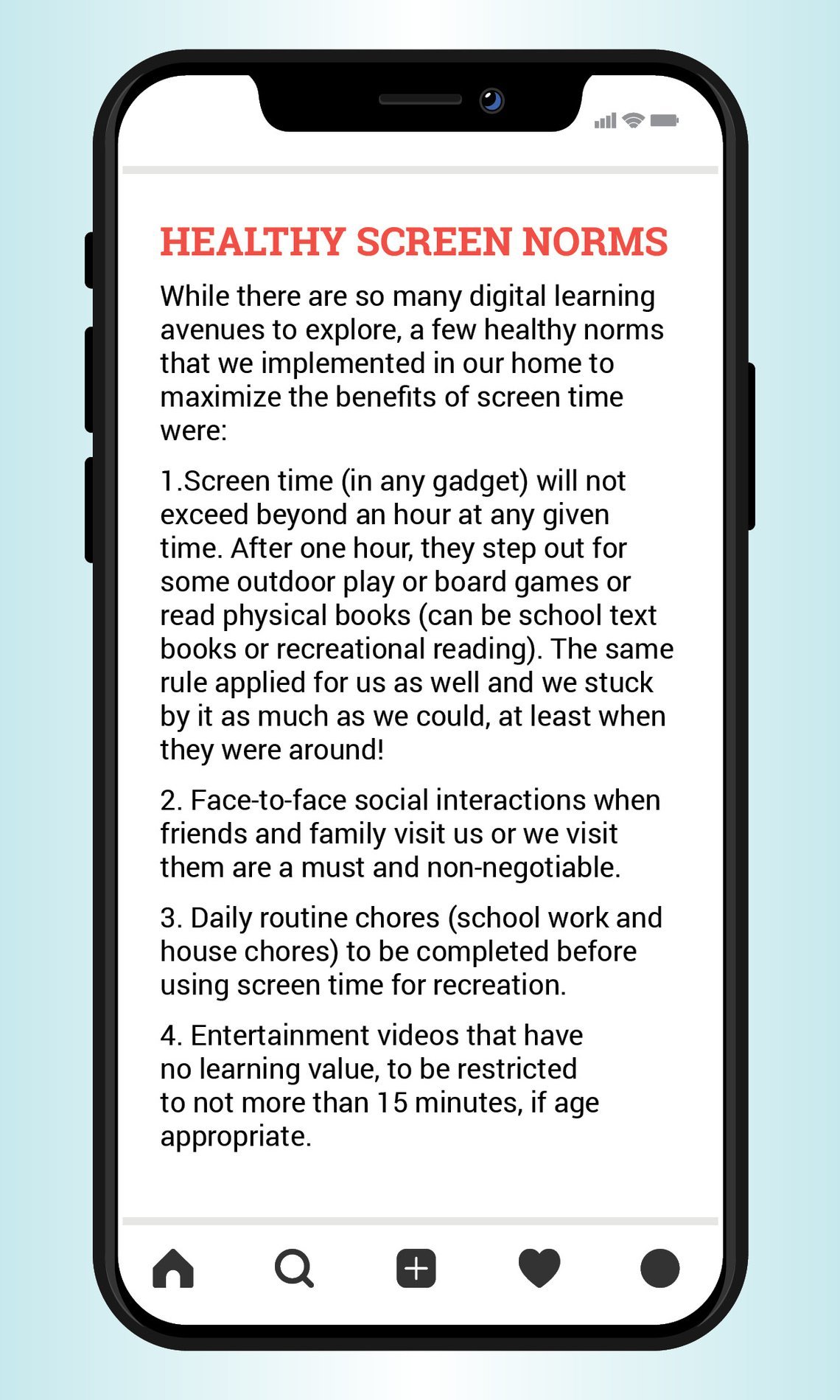
To conclude, only black-painting screen time does a huge disservice to the learning opportunities carefully selected screen content can offer. By regulating and monitoring screen time and choosing quality over quantity, parents can help their children make the most of screens as a powerful educational and learning asset.
In a nutshell
- Early and excessive screen exposure is harmful to children and hence needs to be regulated and monitored.
- It’s important to focus on content quality, and limit quantity.
- To derive learning from screens, parents should encourage their children to engage in active (versus passive) screen time, while remembering to co-view and/or co-play.
- You can choose from a wide range of learning-based digital assets (websites and mobile apps) available in the market.
What parents could do right away
- Set ground rules for using gadgets and insist on their being only supplementary to the traditional learning modality
- Be more actively involved in how to creatively use this screen time to bond with your child and make it a learning and enjoyable experience






























Comments
Jayanthan Jan 29, 2021
Edit
Comment Flag
Cancel Update